


Eventsential
3.19.00 Reviews
App Specs
- Version
- 2026.v2.0
- Updated On
- License
- Free
- Downloads
- 50,000+
- Developer
- Results Direct
- Categories
- Events
- Platform
- Android
Screenshots

 Analysis by AppCompare
When I decide whether to use an event app, I care about more than a polished schedule: I want to know what information I’ll be asked to share, which choices are actually mine, and whether the app is useful enough to justify another account on my phone. Eventsential is an event-focused app from Results Direct, and its purpose is to support events through a mobile experience. I’d treat it as an event companion rather than a general-purpose planner: its value depends on whether the organizer of the event you’re attending uses it and what materials they make available there.
Trust starts with the event itself
That dependence matters when deciding how much to rely on the app. A dedicated event app can bring schedules and related information together in one place, but it is not automatically a universal directory of everything happening nearby. Before building your plans around it, I’d check whether the specific conference, meeting, or gathering I’m attending is represented and whether its event information is current. If the event isn’t supported, a calendar app, the organizer’s own communications, or a general event-discovery service may be more useful.
I also wouldn’t treat a smooth interface as proof of how an app handles personal information. The sensible approach is to read the permission prompts and account choices that appear on your device, and only allow access that makes sense for the task you’re doing. If I’m only checking a schedule, I’d pause before granting access to something that seems unrelated. That is a practical habit, not a claim about any particular permission or data practice.
Keep account and access choices deliberate
When an app asks me to create an account, I consider whether I need features that depend on one before entering details. I also look at the sign-in options shown in the app and choose one I’m comfortable maintaining. Social sign-in can be convenient, while a separate email login may feel easier to keep distinct from other services; neither is automatically the right choice for everyone. The key is to make that decision deliberately instead of tapping through prompts just to reach the schedule.
Event apps can also put different kinds of information close together: a public session description, a personal calendar entry, or attendee-facing communication may have different privacy implications. I’d be especially careful before sharing contact details or sending a message to someone I haven’t met. A useful rule is to share only what helps with a specific event interaction and to avoid treating an in-app profile as something that must be fully completed.
Getting Started with Eventsential
First off, downloading and setting up Eventsential is a breeze. Available on both Android and iOS, the app is free to download from their respective stores. As soon as you fire it up, it prompts you to create an account. You can either sign up using your email or opt for a quicker route by linking your social media accounts. I chose the latter because, let's face it, who remembers passwords these days?
A Well-Organized Interface
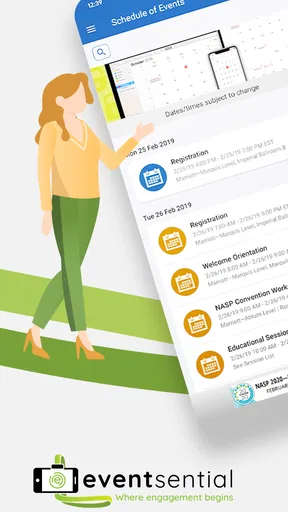
The app's interface is clean and intuitive, which I appreciate. It’s like walking into a well-organized event where everything is easy to find. The home screen gives you a list of upcoming events that you can filter based on your interests. There’s a handy search bar at the top if you’re looking for something specific. Honestly, it feels like the app is designed to cater to every user's unique event needs.
Worth Reading Before You Choose

EA SPORTS FC Mobile 26 Is a Bigger Football Game, but It Takes Time

Flipboard Shows What News Apps Must Do Beyond the Feed

Switching to Android Auto Means Rethinking Your Driving Routine

Google Calendar Makes a Crowded Week Easier to Manage

Ludo King Makes the Most of the Minutes Between Plans

Baby Panda World Brings Quick Play to Modern Phones, but Its Game Library Feels Busy
Features That Stand Out
One of the features I loved is the ability to create your personalized schedule. You can bookmark sessions, set reminders, and even integrate them with your calendar. It’s perfect for someone like me who tends to get lost in the multitude of sessions at large conferences.
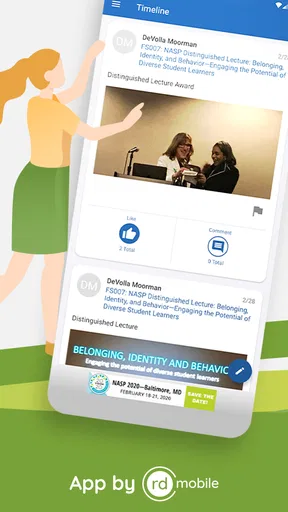
Another cool feature is the networking capability. You can connect with other attendees, speakers, or exhibitors. This is a game-changer if you’re looking to expand your professional circle or collaborate on projects. The in-app messaging system is smooth, making it easy to communicate without switching platforms.
Make a crowded event easier to navigate
The schedule is most helpful when I use it to make decisions before the day gets hectic, rather than trying to browse every session while walking between rooms. I’d shortlist the talks I care about, then leave a little breathing room around them for breaks, travel across the venue, or an unexpectedly useful conversation. A personalized agenda is a guide, not a promise that every session will fit neatly into a day.
There’s also a practical trade-off in calendar integration. It can make commitments easier to see alongside the rest of the day, but it may put event details into a calendar I use for personal appointments. I’d check which calendar is selected before adding sessions, especially if I keep work and personal plans separate. If I’m unsure, bookmarking sessions in the app first gives me a chance to refine the plan before creating calendar entries.
Networking tools are most useful when I have a clear reason to contact someone: following up on a talk, asking about a project, or arranging a conversation during a break. I wouldn’t use messaging just because it is available. A short, specific note is more helpful than a generic introduction, and I’d keep sensitive work or personal details out of a first message. For people who prefer not to message other attendees, the schedule and event materials can still be useful on their own.
Engage with Content
Eventsential offers more than just a schedule. You can access a plethora of content related to the event you’re attending. This includes documents, videos, and even live streams. I found this particularly useful during a conference where I couldn’t attend every session. The app allowed me to catch up later without missing any details.
Use event materials with a little planning
Having event content in the same place as the schedule can save time, but it doesn’t remove the need to plan around the event’s format. I’d look for materials before traveling or arriving, then save the sessions I most want to revisit. If I expect to rely on a video or live stream, I’d also check that I have a suitable connection and enough time to watch; a convenient content library is not the same as having every session available at every moment.
For a realistic day, imagine arriving at a conference with two talks that overlap and a meeting planned afterward. I’d use the schedule to choose which talk is the priority, bookmark the other for later, and check whether related content is available before deciding to skip it. During a break, I could review a document or message a speaker or attendee if the app supports the relevant interaction. That workflow keeps the phone useful without turning every spare minute into screen time.
There is a limit to this approach: event information is only as helpful as the material made available for that particular gathering. If an organizer has not included a session resource, or a detail changes, I would still check the organizer’s announcements or ask staff rather than assume the app is the final authority. For travel-critical plans and room changes, keeping an eye on official event communications is a sensible backup.
Usability and Performance
In terms of performance, the app runs smoothly without any noticeable lags. It’s quick to load and transitions between different sections seamlessly. Battery consumption is moderate, so you won’t find yourself scrambling for a charger halfway through the day.
One minor gripe is that some features might feel a bit overwhelming for first-time users. However, once you get the hang of it, navigating through the app becomes second nature.
Who benefits—and who may prefer another tool
I can see this being a good fit for someone attending a conference or organized event where the app brings together the agenda, supporting content, and attendee interactions. It is especially useful if the day has parallel sessions and I need to keep track of choices without juggling several separate notes. Someone attending only one short talk, with no need to save materials or connect with other participants, may find a basic calendar entry and the organizer’s event page simpler.
Compared with a general calendar, an event app can keep conference-specific items and related content together, while a calendar is often better for seeing the event alongside appointments from the rest of life. Compared with social or event-discovery platforms, a dedicated event tool is more focused on the event already on my itinerary than on finding something new to attend. I’d use the tool that matches the job: a discovery service to browse options, a calendar to manage the whole day, and Eventsential when the event’s own experience is available there.
It may not suit someone who avoids creating accounts, does not want attendee networking, or prefers to keep event details out of a phone app. In those cases, printed materials or the organizer’s website may be less intrusive and perfectly adequate. Likewise, if I need a dependable, broad overview of many unrelated local events, I would look to a general discovery option instead of expecting a single event-focused app to serve that purpose.
What I would check before relying on it
A few small checks make the experience more dependable. I’d confirm that I have selected the right event, review the agenda before the day begins, and verify any calendar entries after adding them. I’d also make sure I know how to find the organizer’s own updates in case a schedule changes. These habits are useful because event plans can shift, and a saved agenda is most valuable when it is easy to compare with current announcements.
If I’m deciding whether to install it, I’d ask myself three practical questions: Is my event using it? Do I want its schedule or content on my phone? Am I comfortable with the account and access choices presented during setup? If the answers are yes, the app has a clear role. If not, I would not install it just because an event has a mobile app; the organizer’s other information channels may be enough.
A cautious verdict for event-goers
Eventsential is a free app in the events category, developed by Results Direct. It has an average rating of 3.1 from around 40 ratings, with over 50,000 installs, and its content rating is Everyone. It first appeared on April 30, 2013, and the current version is 2026.v2.0, requiring Android 9 or later. Those details give a sense of its reach and availability, but they don’t tell me whether a particular event will make full use of it; that depends on the event I’m attending.
My recommendation is conditional rather than universal. If the event you care about is represented and you value a single place for its schedule, materials, and attendee connections, it is worth trying. I’d keep my account choices intentional, share only what I need to, and use the organizer’s communications as a backup for important changes. If you want a general planner or a broad event-finding service, another kind of app will likely fit better.
Why You Should Try It
If you’re an event enthusiast or someone who frequently attends conferences, Eventsential is definitely worth a try. It’s like having a personal assistant who keeps track of everything event-related. From managing your schedule to networking with like-minded individuals, this app covers it all.
So, next time you’re prepping for that big conference or looking to make the most out of a local event, give Eventsential a shot. It might just become your go-to event companion!
Pros
- Intuitive user interface for easy navigation.
- Seamless event synchronization across devices.
- Customizable event notifications and alerts.
- Supports multiple event categories and tags.
- Offline access to saved event details.
Cons
- Limited integration with third-party calendars.
- Requires account creation for full features.
- Occasional sync delays with large events.
- Lacks advanced personalization options.
- No dark mode available for night use.
FAQs for Eventsential
What is Eventsential and what features does it offer?
Eventsential is a comprehensive event management app designed to enhance your experience at conferences, trade shows, and other events. It offers features like personalized agendas, interactive maps, session reminders, and social networking capabilities. Users can also access event materials, participate in live polls, and receive real-time updates, making it an essential tool for both attendees and organizers.
Is Eventsential available on both Android and iOS platforms?
Yes, Eventsential is available for download on both Android and iOS devices. The app can be found on the Google Play Store and the Apple App Store, ensuring compatibility with a wide range of smartphones and tablets. This cross-platform availability allows users to enjoy its features regardless of their device preference.
Does Eventsential require an internet connection to function?
While Eventsential does require an internet connection for initial setup, downloading event data, and receiving live updates, many features can be accessed offline. For example, once event materials and agendas are downloaded, users can view them without connectivity. However, interactive features like live polls and social networking will need an active connection.
How secure is my personal information on Eventsential?
Eventsential takes user privacy seriously and employs robust security measures to protect personal information. Data encryption and secure servers are used to safeguard your details. Additionally, users have control over what information they share, particularly in networking features. It’s advisable to review the app’s privacy policy for detailed information on data handling.
Can I customize my event experience with Eventsential?
Absolutely! Eventsential allows users to tailor their event experience through personalized agendas, bookmarking sessions, and setting reminders for specific events. The app also lets users customize notifications and preferences, ensuring they only receive relevant information. This level of customization enhances user experience and ensures attendees get the most out of the event.


